July 3rd, 2026
New
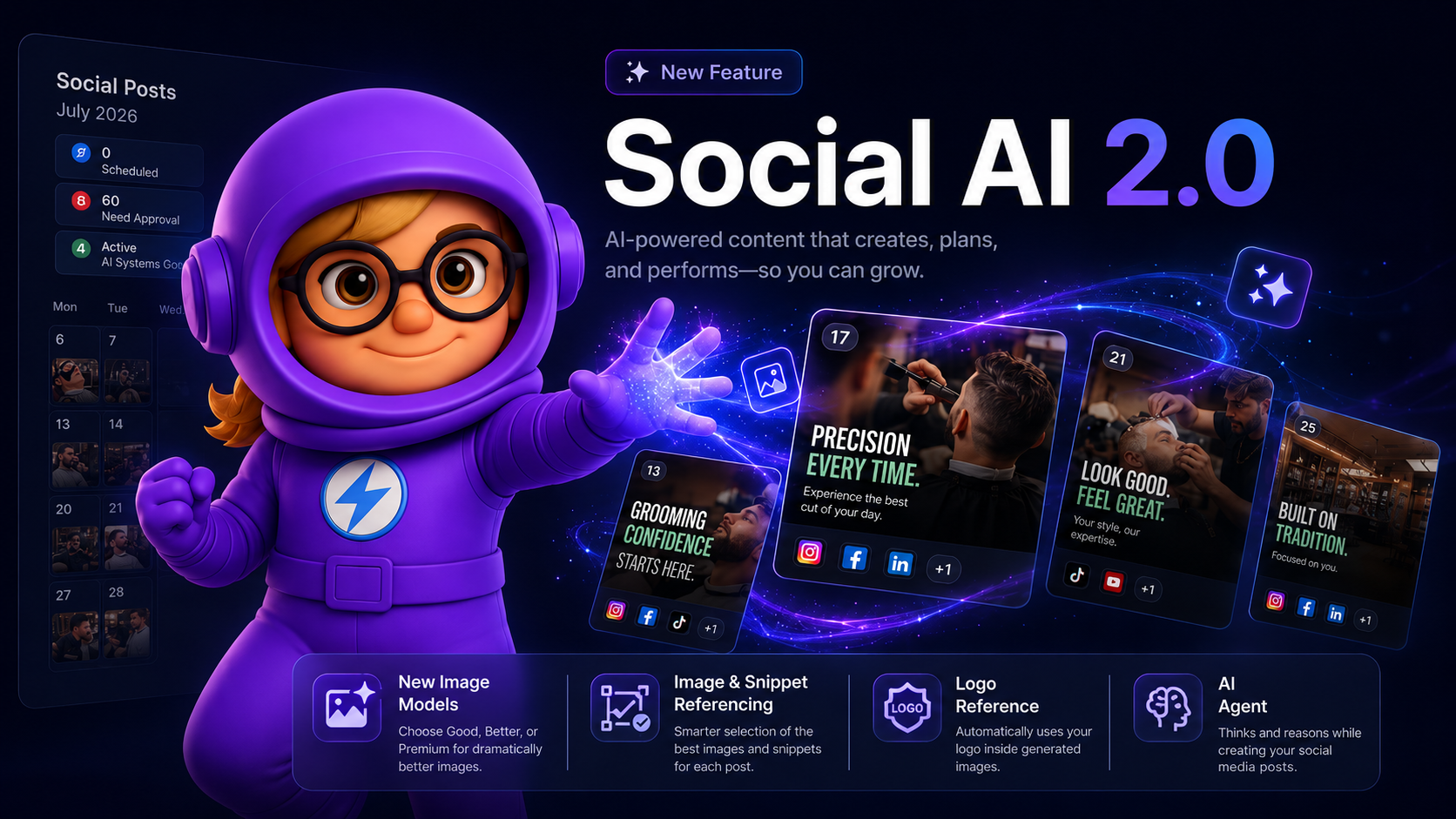
Hey there, we just shipped the biggest upgrade to Social AI yet — a full 2.0 release packed with smarter generation, better visuals, and a brand new agent behind the scenes. 🎉
See what’s new and watch the quick demo below. 👇
What's New
🧠 New AI Agent — Social AI is now powered by a fully rebuilt agent that plans your week, picks the right topics, and writes posts with far more context about your business than before.
🖼️ 10x Better Image & Snippet Referencing — Generated posts now pull from a much wider pool of your brand's images and knowledge snippets, with smarter rotation so you stop seeing the same photos and talking points week after week.
🎨 Upgraded Image Quality — New image generation options produce sharper, more on-brand visuals with better text rendering, lighting, and composition.
🏷️ Logo in Posts — Your business logo can now be intelligently placed into generated images where it makes sense — great for promos, announcements, and branded graphics.
🛒 E-commerce Flow — A dedicated content flow for online stores. Social AI now understands products, collections, and promos, and generates posts designed to drive traffic and sales.
🎯 Smarter Weekly Planning — Themes now rotate intelligently across the week and month, so your feed feels varied instead of repetitive.
✍️ Better Captions & Hooks — Rewritten prompts across the board mean stronger opening lines, cleaner CTAs, and captions that actually sound like your brand.
⚡ Faster & More Reliable Generation — Behind-the-scenes performance work means fewer stuck posts, faster batches, and more consistent output.
🔍 Post Intelligence — Click any generated post to see exactly which images, snippets, and brand info were used to create it — full transparency into how Social AI made its decisions.
Why It Matters
Social AI 2.0 isn't just a bigger model — it's a smarter system. It knows your brand better, uses your real assets more, and produces content that feels personalized, varied, and on-brand every single week.
Want better images in your next batch?
Head to Social AI Calendar > Settings (top right) > Select Your Preferences > Image Quality, select Premium, and watch the upgrade kick in. 🚀
June 2nd, 2026
New

Hey there, you can now upload your own business videos and let Social AI automatically use them in generated social posts! 🎉
How It Works?
Social AI now supports uploaded business videos as part of Personal Branding assets.
Previously, personal Assets only supported images. With this new update, you can now upload your own business videos inside Brand Intelligence → Media Assets, and Social AI can automatically use them while generating social media posts.
To enable this feature, go to:
Social AI → Settings → Preferences → Images & Videos → Personal Branding…👇

Then select either images, videos or both here…👇

Once enabled, Social AI will intelligently try to match your uploaded videos/images with the generated post content whenever relevant.
This helps create more authentic and personalized social media content using your real business footage instead of relying only on AI generated visuals. Businesses can now use product videos, behind the scenes clips, customer experience footage, workspace videos, food preparation videos, service showcase clips, and more directly inside their Social AI workflow.
This is another step toward making Social AI feel more personalized, brand-aware, and authentic for every business… 🚀
May 5th, 2026
New

Introducing ClickGrow Concierge — Someone in your corner, on call.
ClickGrow gives you the AI. Concierge gives you the team.
Hey there, we built ClickGrow Concierge for operators who want an extra set of expert hands as they scale. This is our premium plan for businesses that want a real human partner — onboarding you the right way, optimizing your account as you grow, and helping you get the most out of every credit, every campaign, every workflow.
🚀 What's New
ClickGrow Concierge includes everything in Pro, plus a white-glove service experience designed around you:
1:1 guided onboarding — book your kickoff call when you're ready
Priority concierge support — human chat and text, M–F 9:00 AM – 5:30 PM, with response times typically under a few minutes
Done-With-You optimizations — ongoing, hands-on help tuning your content, automations, and workflows
On-demand strategy calls — book a 1:1 with our team, usually within 24 hours
20,000 credits/month with rollover
Unlimited businesses and users under one account
🎯 How It Works
Upgrade to ClickGrow Concierge in Settings → Billing
Book your kickoff call from your dashboard whenever you're ready to get started
Use your credits across every business in your account
Reach us anytime — chat, text, or scheduled 1:1 — for support, strategy, or a second set of eyes
🤝 The Concierge Difference
Concierge layers a dedicated service experience on top of everything you already love about ClickGrow:
Guided Onboarding. When you're ready, book a 1:1 kickoff call from your dashboard. We'll walk through setup, integrations, and the best way to deploy ClickGrow against your business goals.
Priority Concierge Support. Concierge members get a direct line to our team via human chat and text, Monday through Friday, 9:00 AM to 5:30 PM, with response times typically under a few minutes. It's an added layer of fast, personal access on top of our standard support.
Done-With-You Optimizations. Our team works alongside you — recommending improvements, helping you adopt new features as they launch, and refining your workflows as ClickGrow evolves.
1:1 Strategy Calls, On Demand. Need to talk through performance, plan a campaign, or align ClickGrow with your bigger picture? Book a strategy call and you'll typically be on a call within 24 hours.
📦 What's Included
20,000 credits/month to power every AI feature in ClickGrow — Social AI, Listings AI, Reviews AI, and the wave of new automations rolling out soon (Blogging AI, GBP Optimizer AI, and much more). Credits refresh every billing cycle.
Credit rollover — unused credits carry into the next month (rolled-over credits expire after one additional month; new credits are used first).
Unlimited businesses and users — manage every client and bring your whole team, all under one account.
💳 Pricing
$199/month — billed monthly or annually (annual includes 2 months free).
🧠 Who It's For
Concierge is built for operators who want hands-on help and a strategic partner as they scale, value priority support with real response times, and want someone invested in helping them get more out of ClickGrow as it grows.
Ready to grow with a team in your corner?
Upgrade in Settings → Billing, then book your kickoff call from your dashboard whenever you're ready.
April 23rd, 2026
New
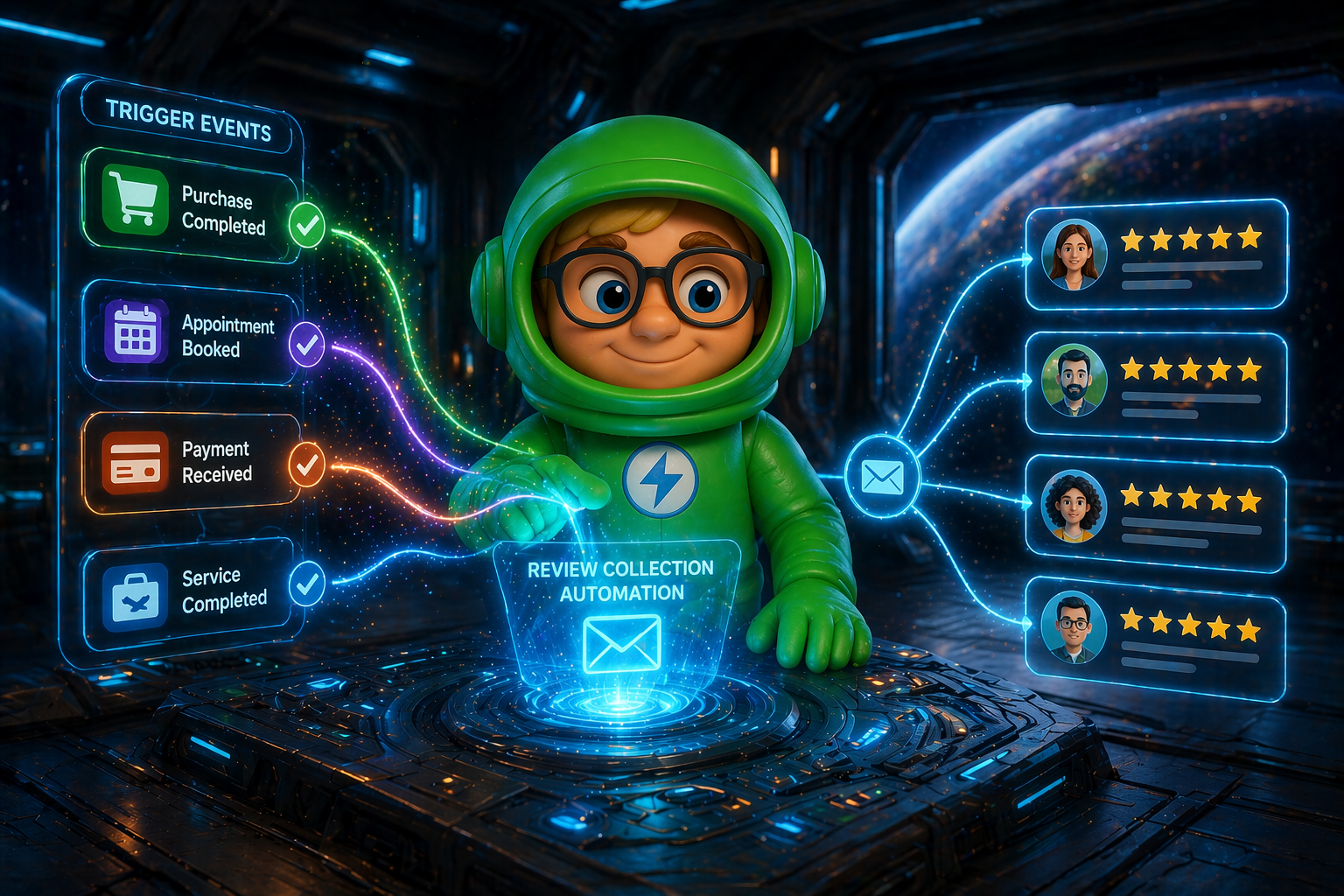
Hey there, we’ve introduced a revolutionary new feature… Reviews Collection Automation, making it easier than ever to get customer reviews without any manual effort.
Now, every time a customer interacts with your business (like making a purchase, booking an appointment, winning a deal in your CRM), the system automatically adds them to a review collection campaign.
Our AI writes hand crafted emails and SMS messages asking them for a review fully autonomously — so you collect 10X more new reviews, faster!
Here’s a quick demo to watch it live in action… 👇
🔗 Connect Your Tools in Seconds

Go to Reviews AI → Collect (Tab)
Connect platforms like Stripe, Square, Calendly, HubSpot, and more
Quick and simple login — no complicated setup
Works with your existing workflow
Start collecting reviews right away
⚙️ How It Works

Once set up, everything runs automatically:
A customer takes an action (like a payment or booking)
The system sends them a friendly message asking for a review
If they don’t respond, it sends gentle follow-ups
It stops automatically once the customer responds or submits a review
You don’t need to track or manage anything — it all happens in the background.
🧠 Smart & Natural Messaging
Messages are written automatically and feel natural:
Personalized based on your business
Not repetitive — each follow-up sounds different
Sent at the right time for better chances of getting a response
📊 Track What’s Happening

You can easily see how things are performing:
How many customers received review requests
Who is still in progress
Who completed the process
💡 Why This Matters
This system helps you generate 10X more reviews automatically — even if you’re not collecting any right now.
93% of consumers read online reviews before choosing a business
Businesses with 4.5★+ ratings get significantly more clicks and calls
Just a 1-star increase can boost revenue by up to 5–9%
And more reviews = higher rankings on platforms like Google, which means more free traffic
If you’re not actively generating reviews, you’re losing customers to competitors who are.
This system fixes that — by consistently bringing in new reviews without you having to chase them.
Now, Reviews AI handles everything for you — collecting reviews, responding to them, and tracking performance — all 100% automated with a single click.
No manual follow-ups, no logging into multiple platforms, and no missed opportunities. It’s the only platform that brings all three together in one place, helping you generate more reviews, stay engaged with customers, and clearly see what’s driving your growth.
April 10th, 2026
Improved

Hey there, we’ve expanded Social AI to support X, making it even easier to automate your social presence across more platforms - all from one place.
Now you can create, optimize, and publish posts directly to X without any extra tools or manual effort.
🔗 Connect X in Seconds
Go to Integrations → Social AI or Social AI → Settings → Connected Social Accounts
Simple OAuth login - no complex setup required
Works instantly with your existing Social AI automations
Start publishing to X alongside your other platforms
⚙️ How It Works
Once connected, Social AI handles everything for you:
Automatically generates content based on your Brand Intelligence
Publishes posts directly to X (Along with other connected social platforms)
Maintains consistency across all your social channels
✂️ Smart Content Optimization for X
One important thing to note is that X has a 280-character limit per post. To handle this, the system intelligently shortens your content while preserving the core message and intent, so your posts remain effective without requiring any manual edits.
💡 Tip: Short, punchy, and engaging posts perform best on X. Let Social AI do the heavy lifting while you focus on growing your brand 🚀
March 26th, 2026
New
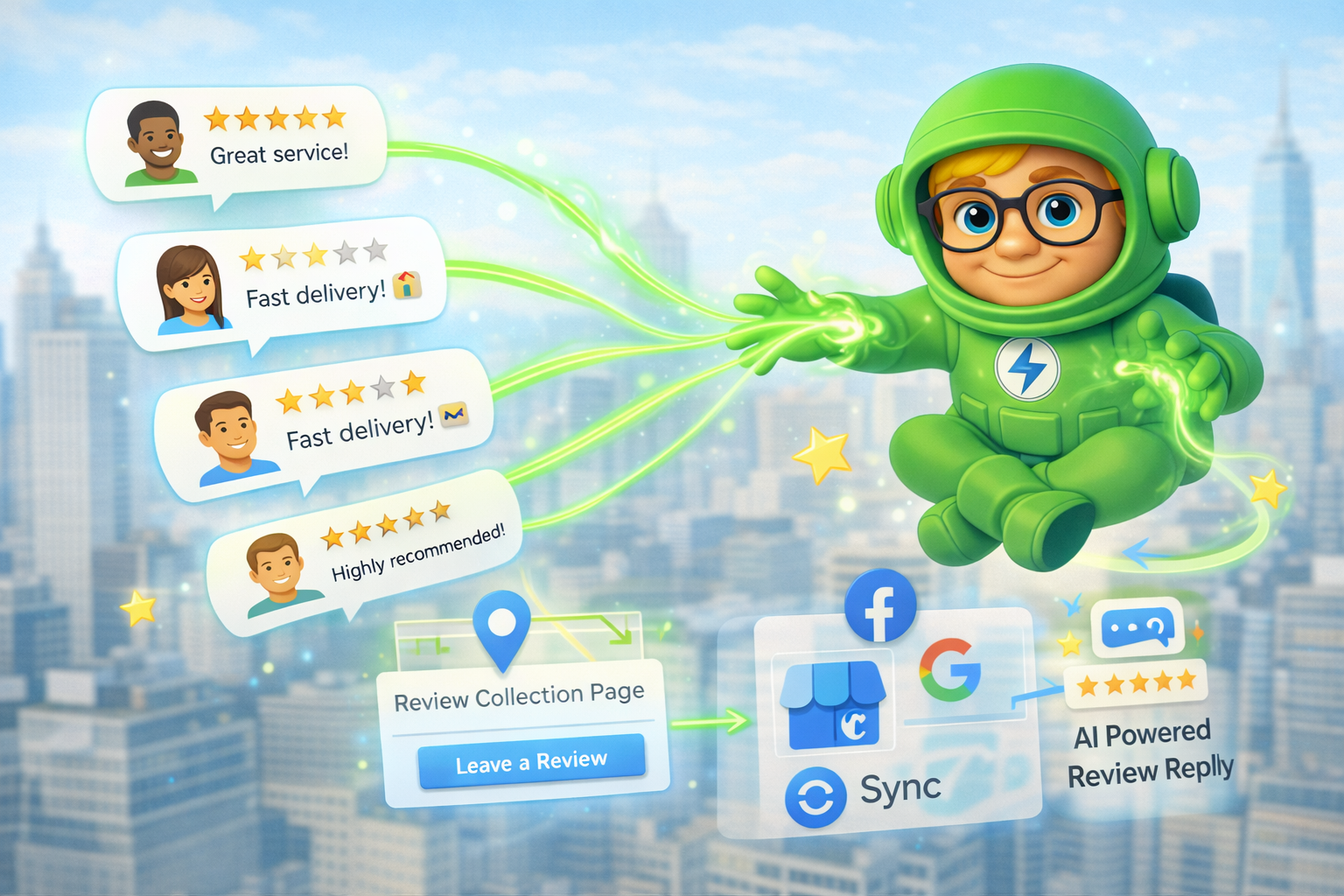
Hey there, we’ve rolled out powerful updates to Reviews AI - making it easier than ever to collect, manage, and respond to customer feedback from one place. And the best part? Review collection is completely free to use.
🌐 Review Collection Page
Collect fresh reviews effortlessly using a simple, shareable link - at no cost. This makes it easy to ask happy customers for feedback right when the experience is still fresh.
Share your Review Collection Page via SMS, email, or even add it to your website.
Customers can leave reviews quickly with a smooth experienceP
Helps increase positive reviews and improve your online presence
You can also fully customize the look and feel of your review collection page.
🎯 How to Use It
Go to Automations → Reviews AI → Settings → Review Collection Page
Copy your public review link
Share it with your customers after a service or purchase
💡 Tip: Send the link right after a happy customer interaction to increase response rates.
⚡ What’s Coming Next…
This is just the beginning. Over the next 1 week we’ll be launching AI Outbound Review Requests, which will automatically sync with your CRM, merchant systems, and customer data to request reviews for you — turning Reviews AI into a complete review generation + response automation engine.
March 17th, 2026
Improved
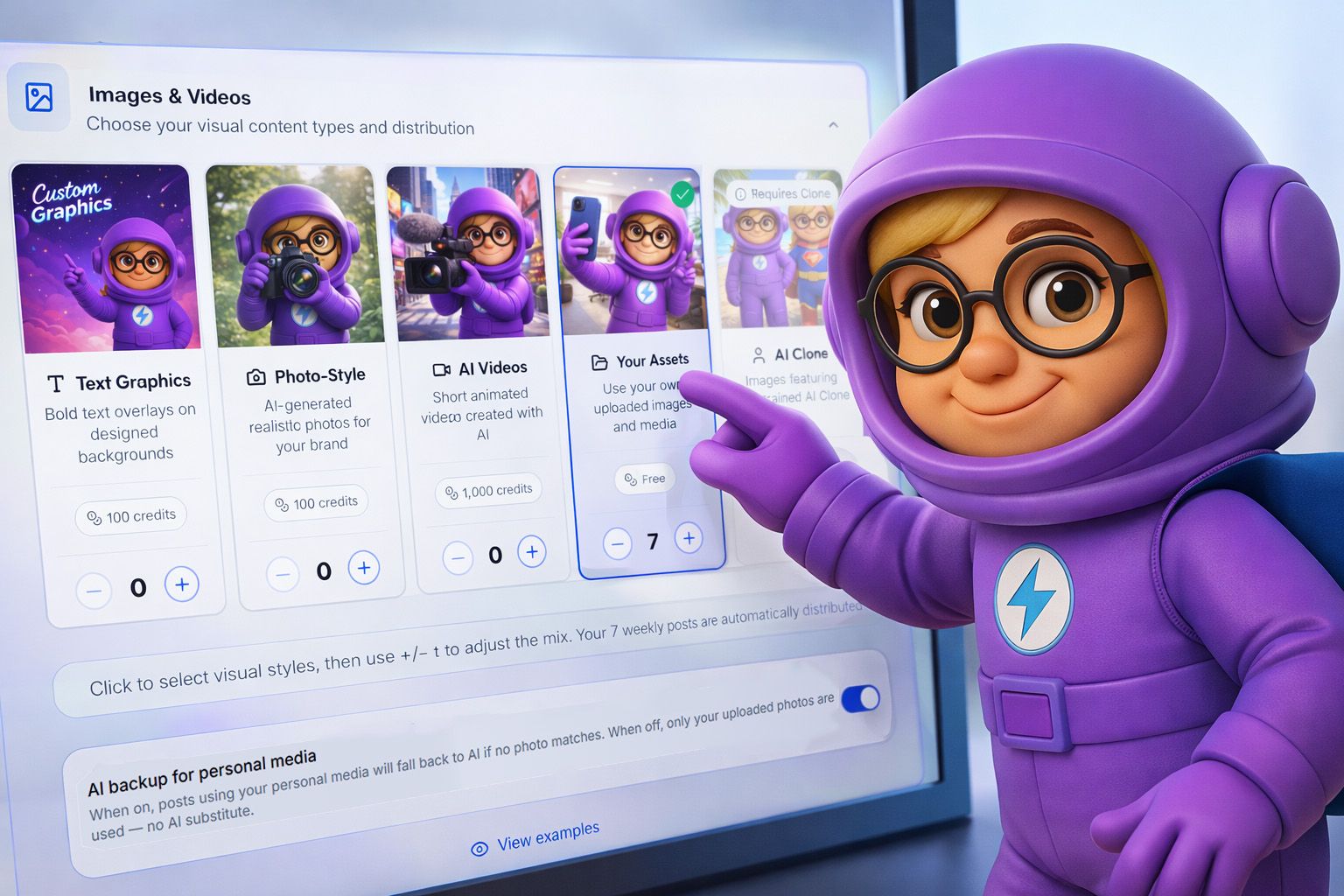
Hey there, we just rolled out two powerful updates to Social AI — giving you more control over your content and images.
🖼️ AI Backup Toggle for Personal Media Posts
Decide when AI-generated images should be used.
Toggle ON → AI creates a fallback image if no matching media is found
Toggle OFF → Only your uploaded media is used (no AI images)
Perfect if you want every post to feature real photos from your business.
🎯 How to Use It
Go to Automations → Social AI → Settings
Select Preferences → Images & Videos
Toggle AI Backup for Personal Media on or off
💡 Tip: Upload 100+ media assets to increase variety and avoid repeats.
✍️ Custom Single Post Generation
Take full control — or let AI handle everything.
Enter a topic → AI generates a post based on your input
Leave it blank → AI creates posts automatically using your business data
🎯 How to Use It
Go to Automations → Social AI
Click Generate Posts button
Select Generate Single Post
Enter your topic in "What’s this post about?" (optional)
Choose your image preference and generate
More control. Smarter posts. Better content. 🚀
March 13th, 2026
New
We're excited, we’ve launched Reviews AI, a powerful automation that monitors and responds to your online reviews using AI — so you never miss a review again for your business.
Instead of logging into multiple platforms and manually replying, Reviews AI automatically generates on-brand responses and publishes them for you — saving hours every week.
✨ What’s New
Reviews AI lets you manage all your reviews from one place.
Multi-Platform Monitoring — Track reviews from Google, Facebook, Zillow, G2, Google Play, and Apple App Store (more integrations coming soon)
AI-Generated Responses — Personalized replies trained on your brand voice
Automation Modes — Let AI reply automatically or review responses before publishing
Negative Review Alerts — Flag low ratings and guide customers to resolve issues
Review Analytics — Monitor ratings, response rates, and trends in real time
All from one unified dashboard.
⚙️ Simple Setup
Activate Reviews AI in seconds:
Go to your Business Dashboard
Click Setup on the Reviews AI automation
Connect your review platforms
Choose Fully Autonomous or Review Before Publishing
Once enabled, Reviews AI starts monitoring and responding automatically.
🏪 Why This Matters
Businesses that respond to reviews build more trust, better rankings, and stronger customer relationships.
Reviews AI helps you:
Respond to reviews in minutes instead of days
Keep your online reputation active
Improve local search visibility
Save hours of manual work
One activation. Every review handled automatically.
⚡ What’s Coming Next…
This is just the beginning. Over the next 1–2 weeks we’ll be launching AI Outbound Review Requests, which will automatically sync with your CRM, merchant systems, and customer data to request reviews for you — turning Reviews AI into a complete review generation + response automation engine.
February 25th, 2026
New

We've launched a brand-new Listings Manager automation, designed to make sure your business shows up correctly across 70+ online directories, so more customers can actually find you.
This update gives you a fully managed way to scan, fix, and sync your business information across the web—with zero ongoing effort on your part.
🚀 What's New
You can now activate the Listings Manager directly from your business dashboard.
Once enabled, we'll automatically:
Scan 70+ major publishers to find where your business is listed (and where it's not)
Detect inaccuracies in your business name, address, and phone number across every directory
Fix and sync your listings so your info is consistent everywhere customers look
Submit your business to directories where you're not yet listed
All from a single dashboard—no manual work required.
🎯 How It Works
Go to your Business Dashboard
Click Setup on the Listings Manager card under Automations
Confirm your business details (name, address, phone)
Click Find My Listings to scan across publishers
Review your scan results—see where you're listed, what's wrong, and what's missing
Our AI will create your new optimized business profile in seconds.
Click Fix My Listings Now to activate
That's it. We handle the rest.
📊 Once activated, your Listings Manager includes three tabs:
Listings
See every directory in one place with real-time status: Live, Processing, or Needs Attention. Filter by status and track rollout progress.
Profile
Update your business info once — name, address, phone, hours, photos — and push it to all directories automatically. Get optimization tips and view change history.
Analytics
Track impressions, clicks, calls, and directions. Break down performance by directory and see which listings drive the most engagement.
🏪 Why This Matters
Inconsistent or missing listings cost local businesses real customers. When your name, address, or phone number is wrong on a directory, people can't find you—or worse, they find outdated information and lose trust.
The Listings Manager fixes that problem automatically:
More visibility — Get listed on directories you're missing from
More trust — Consistent info everywhere builds credibility
More foot traffic — Customers searching locally actually find the right details
Less work — No more manually updating dozens of sites one by one
One activation. Ongoing accuracy across the entire web.
February 9th, 2026
New

We’ve added a brand-new “Visit Us” Call-To-Action (CTA) to your Social Media Calendar—designed specifically for local businesses that want to drive real-world foot traffic from social content.
This update allows you to automatically include a physical address CTA directly inside select post types.
🚀 What’s New
You can now choose “Visit Us” as a CTA and set any address you want to appear in your content.
CTAs will automatically be included in:
Service Highlight posts
FAQ posts
Perfect for businesses that want their social media content to actively encourage customers to stop by in person.
🎯 How It Works
Go to your Social Media Calendar
Click Settings
Select Content Styles
Choose the Visit Us CTA
Enter the address you want displayed
Once enabled, the CTA will be automatically applied to eligible posts going forward.
🏪 Why This Matters
If you’re a local business, this makes your social content more actionable—turning posts into a simple, consistent way to drive visits to your physical location without any extra work.
One setting. Ongoing impact.